Email: hello@attors.comServing businesses and agencies in the US, UK & Europe Rated 5.0 on Google
Attors Technologies
Attors Technologies

Menu

Project enquiries

hello@attors.comChat on WhatsAppMon–Sat, 04:00–21:00 UTC. We reply within one business day.
Wix to WordPress Migration Service

Wix to WordPress Migration That Keeps Your Pages and SEO

Attors moves Wix websites to WordPress with every important page, blog post and image accounted for. A redirect map sends old Wix URLs to their new WordPress pages, so visitors and search engines find them. Migrations start at $490 for up to 10 pages.


Two specialists planning a Wix to WordPress migration
Wix to WordPress Pricing

How Much a Wix to WordPress Migration Costs

The price depends on how many pages and blog posts you have and whether you sell through Wix Stores. Every plan includes redirects and SEO carry-over.

Small Site

$490one-time

A complete move for a Wix site of up to 10 pages.

  • Up to 10 pages rebuilt
  • 301 redirects from every old URL
  • SEO titles and descriptions moved
  • Images transferred
  • Editing training and 30 days of free support

Typical timeline: 1–2 weeks

Get a Quote

Store

from$1,690one-time

A complete move for Wix Stores, bookings or member areas.

  • Products moved to WooCommerce
  • Bookings or members rebuilt
  • Everything in Business Site

Typical timeline: 3–4 weeks

Get a Quote

Every project starts with a fixed written quote, so the price is agreed before any work begins. Projects under $3,000 are paid 50% upfront and 50% at launch. Larger projects are paid in three milestones of 40%, 30% and 30%.

See all pricing
On every project

Six Commitments, Written Into Your Quote

The same terms whatever the size of the job. Rated 5.0 on Google from 14 reviews, with clients in the US, UK, Ireland, Denmark and the UAE.

Get a fixed quote Hours: Mon–Sat, 04:00–21:00 UTC

Why Businesses Leave Wix

When Wix Starts Holding Your Business Back

Wix is easy to start with. Growing businesses often outgrow it and need more control, speed and flexibility.

Discuss Your Migration

You Do Not Really Own the Site

Wix sites cannot be exported or moved to other hosting. WordPress gives you full ownership of files and content.

SEO Options Feel Limited

Advanced SEO control can be restrictive on Wix. WordPress offers full control of URLs, metadata and structured data.

Pages Load Slowly

Heavy Wix templates can slow mobile pages. A lean WordPress theme can load faster on real devices.

Features Need Expensive Apps

Monthly app fees add up quickly. WordPress plugins and custom features often cost less over time.

Content Is Hard to Scale

Large blogs and resource libraries become awkward on Wix. WordPress handles growing content easily.

Developers Cannot Extend It

Custom integrations are limited on Wix. WordPress connects to CRMs, booking tools and APIs.

Choose Your Migration Approach

Recreate the Current Design or Refresh It During the Move?

Every Wix migration needs a rebuild, because Wix designs do not export. The choice is whether to match the current look or improve it at the same time.

01

Close Design Recreation

For businesses happy with their Wix design who mainly want WordPress control, speed and ownership.

Best when

  • Customers know and like the current design
  • The main goal is platform control
  • You want the fastest route to WordPress

Outcome: A WordPress site that closely matches your Wix design, with all content moved and redirects in place.

Recreate My Design
02

Migration With a Redesign

For businesses that want to fix layout, content or conversion problems while moving platforms.

Best when

  • The Wix site looks dated or confusing
  • You want new pages or features
  • Mobile layouts need improvement

Outcome: A refreshed WordPress website with improved structure, content moved and SEO protected.

Plan a Redesign Migration
What the Migration Includes

What Our Wix to WordPress Migration Service Covers

Each migration starts with a full inventory of your Wix site, so nothing important is missed.

Get a Migration Quote

What You Receive

What You Get From a Wix to WordPress Migration

Every migration includes the items below. Extra features are agreed in the quote.

Plan Your Migration

Wix Site Inventory

A list of every page, post, image, form and app on the current site.

Migration Plan and Quote

Scope, timeline, design approach and price confirmed before work begins.

Staging Website

A private WordPress staging site to review before launch.

Rebuilt WordPress Site

Your design and content on a clean, editable WordPress theme.

Redirect Map

Old Wix URLs mapped to new WordPress pages with permanent redirects.

SEO Carry-Over

Titles, descriptions, alt text and structured data moved or improved.

Launch Checklist

DNS, SSL, forms, redirects and indexing checked at go-live.

Editor Handover

A short guide to editing your new WordPress website.

Rated 5.0 from 14 Google reviews

What clients say about working with Attors Technologies

nfor ransomWebsite restored to WordPress
★★★★★

Amazing job. Our website site was fully restored to Wordpress by their team. We came across them on Fiverr and started our first project with the help of Abuzar. Although we had few revisions, their patience, collaboration and dedication greatly contributed to realize the final outcome which was exactly the same as our site use to be from the wayback machine. Thanks a lot brother and looking forward in doing business with you as this met my expectations

AndArstWordPress restoration
★★★★★

WP restoration at its best. Fast, top notch quality, great communication.

Jon BillingtonSeveral website projects
★★★★★

We’ve been working with Abuzar and the team at Attors Technologies for several years and have completed many successful website projects together. Their expertise in web development and digital solutions is outstanding. Abuzar is always professional, responsive, and committed to delivering secure, scalable results that align perfectly with our goals. It’s rare to find a partner this consistent and dependable, highly recommend them for any business looking for a trusted technology partner.

How the Migration Works

How We Move a Website From Wix to WordPress

The Wix site stays live until the new WordPress site is approved, so visitors never see a broken site.

Explore our full process
  1. Step 01

    Inventory the Wix Site

    We list every page, post, image, form and app, and note the current URLs.

    You review
    Site inventory
    You approve
    Confirm what moves
  2. Step 02

    Plan and Quote

    We agree the design approach, features, timeline and fixed price.

    You review
    Migration plan and quote
    You approve
    Approve the plan
  3. Step 03

    Build on Staging

    The WordPress theme is built and content moved to a private staging site.

    You review
    Staging website
    You approve
    Review the build
  4. Step 04

    Prepare Redirects and SEO

    The redirect map, metadata and structured data are prepared and checked.

    You review
    Redirect map and SEO checks
    You approve
    Approve launch readiness
  5. Step 05

    Launch

    We switch the domain to WordPress and activate redirects and SSL.

    You review
    Live WordPress site
    You approve
    Confirm go-live
  6. Step 06

    Post-Launch Checks

    Redirects, forms, indexing and Search Console are checked after launch.

    You review
    Post-launch report
    You approve
    Accept the migration

Protecting Your Rankings

How We Protect SEO During a Wix to WordPress Move

Most traffic loss after a migration comes from missing redirects and lost metadata. We plan both before launch.

Ask About SEO Safety

What We Check Before Launch

Every Important URL Redirected

Old Wix URLs point to their matching WordPress pages with permanent redirects.

Metadata Carried Over

Titles and descriptions are moved, then improved where it helps.

Images and Alt Text

Images keep or gain descriptive alt text and sensible file names.

Internal Links Updated

Links inside your content point to the new WordPress URLs.

Forms Tested

Every form is tested so enquiries keep arriving after launch.

Search Console Updated

Sitemaps are submitted and indexing is checked after the switch.

Wix Stays Live Until Approval

Your Wix site stays online until the new site is approved.

Domain Ownership

Your domain stays in your name throughout the move.

If You Want Changes During the Move

New pages or features can be added during migration. We confirm the effect on price and timeline first.

  1. 01

    Share the Request

    Tell us what you would like to add or change.

  2. 02

    See the Impact

    We confirm any change to cost and timeline.

  3. 03

    Approve and Continue

    Work continues once you approve the change.

Moving From Another Platform?

We also migrate sites from Squarespace, Webflow and older WordPress builds, with the same redirect and SEO safeguards. Selling on Wix Stores? We move products to WooCommerce.

Website Migration Services
Guides & Resources

Guides to Help You Plan

Plain-English answers to the questions buyers ask before a project like this, from costs to checklists.

View All Insights
Frequently Asked Questions

Wix to WordPress Migration FAQs

Answers about design, SEO, timelines and costs when moving from Wix.

Can a Wix website be exported to WordPress?

Not directly. Wix does not export designs, and only some content can be exported. A Wix to WordPress migration therefore means moving content and rebuilding the design in WordPress.

Will I lose my Google rankings when moving from Wix?

Rankings are protected when every important URL is redirected and metadata is carried over. We prepare a redirect map before launch and check indexing afterwards.

Can you keep my current design?

Yes. We can recreate your Wix design closely in WordPress, or refresh it during the move if you want improvements.

How much does a Wix to WordPress migration cost?

A site of up to 10 pages costs $490. Up to 30 pages with 50 blog posts and a design refresh costs $890. Wix Stores, bookings and member areas start at $1,690. Every plan includes redirects from your old Wix URLs and SEO settings moved across.

How long does a Wix to WordPress migration take?

Small sites often take two to three weeks. Larger sites, online stores and redesigns take longer, and the quote confirms the timeline.

What happens to my Wix blog posts?

Blog posts are moved with their text, images, headings and categories. Each old post URL redirects to its new WordPress address.

What about Wix forms, bookings and stores?

We replace Wix apps with suitable WordPress solutions, such as form plugins, booking tools or WooCommerce, and test them before launch.

Do I keep my domain name?

Yes. Your domain stays in your name. At launch we point it to the new WordPress hosting and activate SSL.

Have you migrated a Wix site before?

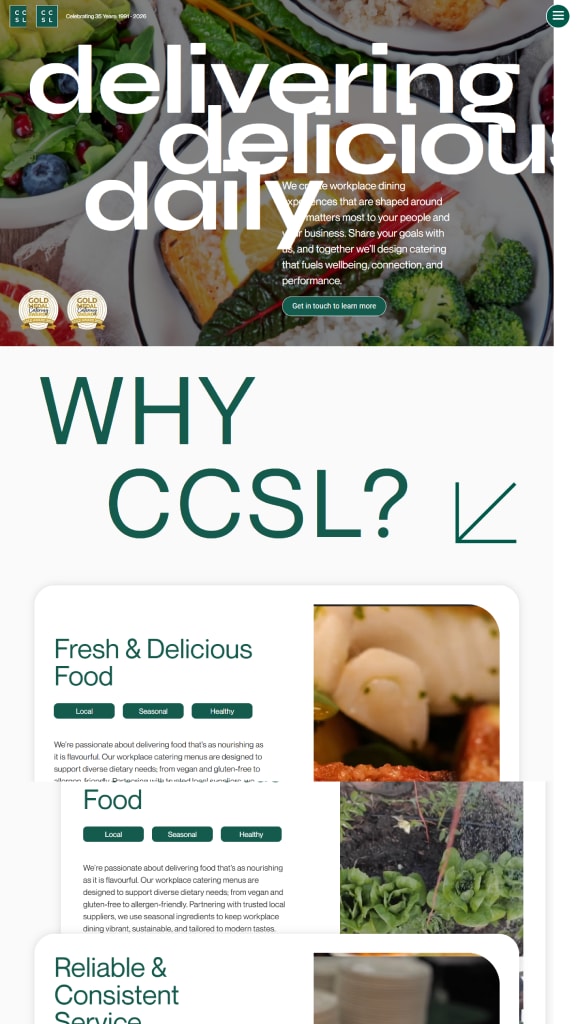
Yes. Our portfolio includes a Wix to WordPress recreation for a corporate catering company in Ireland.

Why hire a Wix to WordPress migration specialist?

Wix has no full export, so pages, posts and images must be moved by hand and every old URL redirected. A specialist handles the redirect map, SEO settings and design rebuild, so you keep your traffic through the move.

Start a Project

Plan with clarity

Plan Your Wix to WordPress Migration

Share your Wix website address, the number of pages and posts, and any apps you use. We reply with questions and a migration quote.

  • Full inventory first
  • Redirect map before launch
  • Wix stays live until approval
Start a Migration Brief

About Your Wix Site

  • Wix website address
  • Approximate pages and blog posts
  • Wix apps in use
  • Launch deadline

Your WordPress Goals

  • Recreate or refresh the design
  • New pages or features
  • Hosting preference
  • Who will edit the site
Timeline
Small Wix sites often move in two to three weeks. Larger sites, stores and redesigns take longer, and we confirm the timeline in the quote.
Cost
Starter costs $490 for up to 10 pages, Business $890 for up to 30 pages and 50 blog posts, and stores start at $1,690. You receive a fixed quote before work starts.
One Project Contact
Name one person who reviews the staging site and approves the launch.
Final scope
Your quote lists pages, posts, features, design approach, redirects, timeline and price.